Lava is a Python framework for building neural networks that is developed and maintained by Intel. It offers deployment options to Intel’s Loihi chips, particularly the newest Loihi 2 chip.
Lava-dl is an extension of Lava that focuses on deep learning applications and adds more neuron models and also PyTorch-based training algorithms (SLAYER) and model conversions from ANNs.
NIR has been tested with Lava, and Lava-dl. The following code will show how to import a NIR graph into Lava and Lava-dl. It uses the NIR2Lava script from the NIR repository.
Supported Primitives in Lava
This library does not support conversion of any nodes to NIR.
This library supports conversion of the following nodes from NIR:
Conv2d
Flatten
Affine
Linear
CubaLIF
IF
LIF
SumPool2d
NIR to Lava
import numpy as np
import nir
import matplotlib.pyplot as plt

ng = nir.NIRGraph(
    nodes=[
        nir.Input(input_type=np.array([3])),
        nir.Affine(weight=np.array([[8, 2, 10], [14, 3, 14]]).T, bias=np.array([1, 2])),
        nir.LIF(
            tau=np.array([1] * 2),
            r=np.array([1] * 2),
            v_leak=np.array([0] * 2),
            v_threshold=np.array([1] * 2),
        ),
        nir.Output(input_type=np.array([3])),
    ],
    edges=[(0, 1), (1, 2), (2, 3)],
)
We can use the library_preference argument to specify that we want to convert our NIR graph to Lava (instead of Lava-dl). Additionally, we can also specify a timestep dt that is used to discretize the neuron equations, and we can specify if we want the Lava network to run on_chip or not (if you don’t have access to a Loihi chip, set this to False and use Lava’s bit-accurate simulator instead), and also whether to use fixed precision (integers) or floating precision.
from nir_to_lava import ImportConfig, LavaLibrary, import_from_nir

config = ImportConfig(
    dt=1e-4, fixed_pt=False, on_chip=False, library_preference=LavaLibrary.Lava
)
lava_nodes, start_nodes, end_nodes = import_from_nir(ng, config)We now configure the input and output to/from the NIR graph:
input_data = None # here you can specify the input data to test your networkfrom lava.proc.monitor.process import Monitor
from lava.magma.core.run_conditions import RunSteps
from lava.magma.core.run_configs import Loihi2SimCfg, Loihi2HwCfg
from lava.proc.io.source import RingBuffer
if config.on_chip:
from lava.proc.io.sink import RingBuffer as Sink
from lava.proc.embedded_io.spike import PyToNxAdapter, NxToPyAdapter
from lava.utils.loihi2_state_probes import StateProbe
ring_buffer = RingBuffer(data=input_data)
first_node = lava_nodes['0'] # point this to the node that should receive the input
last_node = lava_nodes['1'][1] # point this to the node that should output the result
if config.on_chip:
sink = Sink(shape=(1,), buffer=input_data.shape[1])
py2nx = PyToNxAdapter(shape=(1,))
nx2py = NxToPyAdapter(shape=(1,))
ring_buffer.s_out.connect(py2nx.inp)
py2nx.out.connect(first_node.s_in)
first_node.a_out.connect(last_node.a_in)
last_node.s_out.connect(nx2py.inp)
nx2py.out.connect(sink.a_in)
else:
ring_buffer.s_out.connect(first_node.s_in)Now we can run the network in Lava (here we assume that the last node is a LIF):
n_steps = 1000

if config.on_chip:
    probe_v = StateProbe(last_node.v)
    probe_u = StateProbe(last_node.u)
    callbacks = [probe_v, probe_u]
    run_cfg = Loihi2HwCfg(callback_fxs=callbacks)
else:
    mon_volt = Monitor()
    mon_curr = Monitor()
    mon_spk = Monitor()
    mon_inp = Monitor()
    mon_volt.probe(last_node.v, n_steps)
    mon_curr.probe(last_node.u, n_steps)
    mon_spk.probe(last_node.s_out, n_steps)
    mon_inp.probe(ring_buffer.s_out, n_steps)
    tag = "fixed_pt" if config.fixed_pt else "floating_pt"
    run_cfg = Loihi2SimCfg(select_tag=tag)

last_node.run(condition=RunSteps(num_steps=n_steps), run_cfg=run_cfg)
if config.on_chip:
    sink_data = sink.data.get()
    last_node.stop()
And finally we plot the results:
inp_spikes = input_data.reshape(-1)

if config.on_chip:
    spikes = sink_data.reshape(-1)
    voltage = probe_v.time_series.reshape(-1)
    print(f'spikes: {spikes.shape}, voltage: {voltage.shape}')
else:
    spikes = mon_spk.get_data()['lif']['s_out'].reshape(-1)
    voltage = mon_volt.get_data()['lif']['v'].reshape(-1)
    print(f'spikes: {spikes.shape}, voltage: {voltage.shape}')

sfx = 'fixed' if config.fixed_pt else 'float'
device = 'loihi' if config.on_chip else 'cpu'
with open(f'lif_lava_{device}_{sfx}.csv', 'w') as fw:
    for idx in range(inp_spikes.shape[0]):
        fw.write(f'{inp_spikes[idx]},{voltage[idx]},{spikes[idx]}\n')

fig, axs = plt.subplots(3, 1, figsize=(10, 7), sharex=True)
fig.suptitle(f'LIF ({sfx} pt) on {device}')
# fig.suptitle(f'LIF ({sfx} pt) on {device} with du={du}, dv={dv}, vth={vthr}')
mon_volt.plot(axs[0], last_node.v)
mon_curr.plot(axs[1], last_node.u)
mon_inp.plot(axs[2], ring_buffer.s_out, label='ring buffer output')
axs[2].eventplot(np.argwhere(input_data.reshape(-1) > 0).reshape(-1), color='r', label='data')
axs[2].legend()
# axs[2].set_xticks(np.arange(0, n_steps, 1), minor=True)
axs[0].set_title('LIF voltage')
axs[1].set_title('LIF current')
axs[2].set_title('Input spikes')
plt.tight_layout()
plt.savefig('output.png')
plt.show()
from IPython.display import Image
Image(filename='output.png')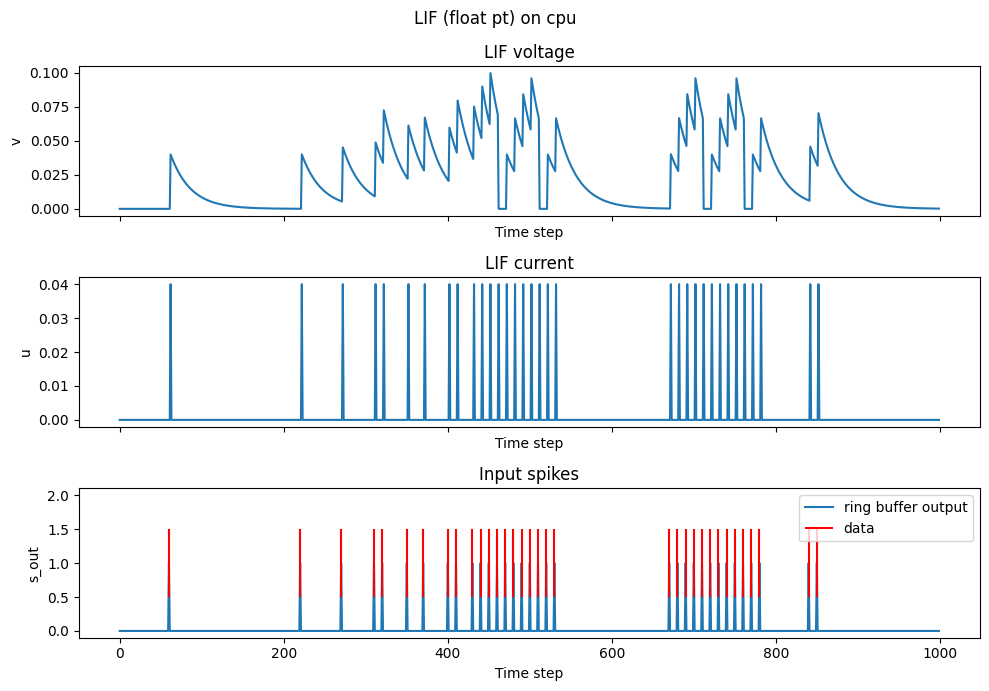
NIR to Lava-dl
The conversion from NIR to Lava-dl is comparatively simpler, as the resulting object is a PyTorch module that you can run. Here’s the code snippet to convert the same NIR graph to a PyTorch network using Lava-dl components. Please see the lava-dl docs for more information about lava-dl and how to deply your lava-dl network to a Loihi chip.
import_config = ImportConfig(library_preference=LavaLibrary.LavaDl)
net = import_from_nir(ng, import_config)